Install and Setup
Installation
Octopus Watch is available on the Apple App Store and the Google Play Store. The app supports iOS 16 and later, iPadOS 16 and later, Android 9 and later, and watchOS 9 and later.
Setup
On first launch you are greeted with the setup screen. This screen allows you to log in using either a postcode, or using your API credentials provided by Octopus Energy.
Sharing Credentials
Already have a device with Octopus Watch installed? You can easily set up another device without typing/copying the credentials again. On the device with Octopus Watch installed follow these steps:
- go to the Settings tab;
- scroll to the bottom;
- tap on the button labelled "share" to see a QR code;

Open the app on the other device. Tap on "scan" at the bottom of the Settings tab. Your credentials are now copied to the new device. All that is left to do is tapping on "Validate".
API Login
Most users choose the API login. With the API login the app can show you information for the tariff you are currently on, as well as an overview of your historic consumption data.
The API Login:
- is secure (credentials stored encrypted on device)
- requires a smart meter
- requires an Octopus Energy account
- shows your historic energy usage
- shows your current and historic rates
To use the API login method you need an API key from the Octopus Energy website. Follow these four steps to get the key and log in to the app :
- Log in to the Octopus Developer website: https://octopus.energy/dashboard/developer/
- Look for the section titled Authentication.
- Copy your API key into the designated field of the Octopus Watch app.
- Tap on "Validate".
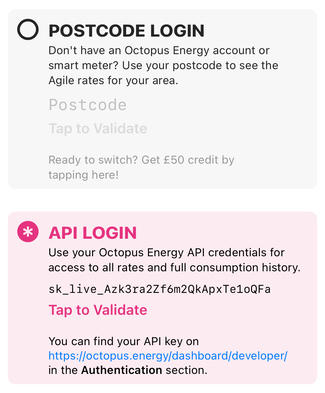
Both the Rates and the History tab become available as soon as your API credentials are validated and stored.
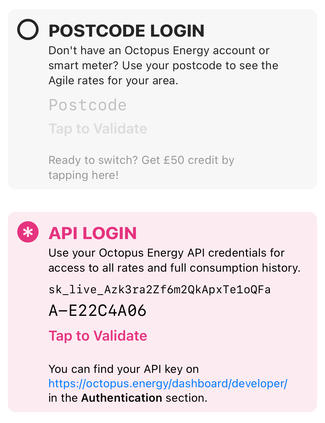
In most cases the app can automatically find your account number. If the app has issues logging you in, the app will request either your account number or MPAN. This can happen if multiple accounts are linked to your credentials, or if your property has multiple (import) meters. You can find your account number – if needed – at the top of the Octopus Energy Dashboard: https://octopus.energy/dashboard/new/accounts/. To find the desired MPAN follow the instructions on the multiple meter page. After the app requested it, enter the account number or MPAN below the API key:
Postcode Login
If you are not yet an Octopus Energy customer, or if you value privacy above all else, you can use a postcode or outcode (e.g. BT5) to log in and see the Agile prices for your area.
The Postcode Login:
- is very secure
- doesn't require a smart meter
- doesn't require an Octopus Energy account
- doesn't show energy usage
- doesn't show your tariff; it always shows Agile
Validation should only take a moment. As soon as your postcode is validated and stored the Rates tab becomes available.