Missing Data
Smart meters may occasionally encounter hiccups, such as missing data. This is common when you recently had a smart meter installed, or switched to Octopus Energy. Occasionally, even for existing users, data for a few days may be unavailable. Don't worry: Octopus Watch continuously checks for this missing data and displays it as soon as it becomes available.
But sometimes, data really is missing. Or data isn't loading in the app.
Intelligent Flux export missing
The rate information of the Intelligent Flux export tariff is currently not available through the Octopus Energy API. This is likely a mistake on the end of Octopus Energy and they have been made aware of the issue. Octopus Watch cannot retrieve your export data if you are on this tariff until this is fixed by Octopus Energy.Invalid API Key
If the app is not loading any data, then you may have an expired/invalid API key. Only the last API key you created on the Octopus Energy website is valid. All previous API keys are automatically revoked. To verify that the API key in the app is still valid follow these steps:
- open the app and go to the Settings tab;
- visit the Octopus Developer website;
- you can see the active API on this page as, for example,
sk_live_lFND****
verify that the first 4 letters/numbers,lFND, match with the API key used in the app.

Are the letters/numbers different? In this case you need to create a new API key by tapping on "Regenerate my API key". Replace the existing API key in the app with the new API key and tap on "Verify". If all goes well, the app now has full access again and loads your data.
Are the letters/numbers the same? Please read on for further help.
API access validator
An API validator is available on the Octopus Watch website. You can access the API validator by tapping here.Please remember that you can only have one active API key. Octopus Watch does not hide your API key, so if you need the API key for another app or tool you can always come back to the Octopus Watch app to copy your API key from there.
Understand Missing Data
Octopus Watch makes it easy to see your missing data and help you to understand what it means. Days with missing data are clearly marked and show how many hours you're missing. If you have a subscription, you can jump into the day details and see exactly which half-hourly records are missing.
Octopus Watch doesn't automatically accept days with missing data. That's because:
- more data may still be coming in;
- the missing data might indicate a meter problem;
- one day isn't the other – missing data could be just a half hour or 10 hours.
For these reasons, two safeguards remain in place:
- the app continues to mark a day as having no data if there are more than 10 hours of data missing;
- you can now accept incomplete days. But only if your meter has since started reporting correctly again (there is a more recent day where all records for that day have been correctly retrieved).
Octopus Watch won't fetch missing export meter data when your import meter is working correctly. Export meter data often arrives a bit later than your import meter data. If meters fail, the import/export meters tend to fail in unison. So if your import meter is working fine, there's very likely nothing to worry about and your export meter data will arrive later in the day.
Do you have a Home Mini?
If you have a Home Mini you may find that the Octopus Energy website shows you data for the last day(s), while Octopus Watch tells you that the data is missing. Octopus Watch will only show you the data once Octopus Energy has retrieved your data from DCC. That's because only this data can be used for billing, and only this data is final. The data from your Home Mini that the Octopus Energy website shows on these days is only there to obscure that the official data hasn't arrived yet, and this Home Mini data is only indicative and may change.Dealing with Missing Data
If you want to use a day with missing data in any of the statistics – such as weekly summaries or energy reports – you need to accept the data. When this is possible a button is shown on the right-hand side. Simply tap this button to accept the data as is. As soon as you accept data, Octopus Watch will make no further attempts to fetch the missing data.
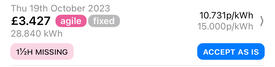
Remember that this button only shows when your meter has started reporting correctly again.
Once accepted, the data appears as normal and can be used as normal. For your reference, these days are marked with a "missing data" icon next to the date.

If you have a subscription you can also look at the day details. These give you a bird's eye view of which data is missing. Half an hour in the middle of the night may not be a big deal, but half an hour during a plunge may be a good time to get in touch with Octopus Energy and discuss the options to recover this data.
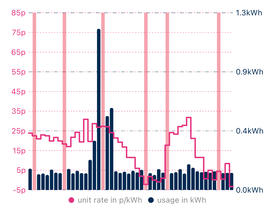
Each red vertical bar indicates a missing record. These may appear throughout the day, or be clustered on one side. Any missing data is obviously bad, but some can be worse indeed. Even after accepting a day with incomplete data you can still open the day details to see exactly which information for that day is missing.
I Still have Missing Data!
Missing data can be extremely frustrating. You already checked your API key, and you accept that there can be gaps – but the missing data still feels out of place. There are a few more caveats to consider.
Was there a plunge?
Data can update a bit more slowly the day after a price plunge (on Agile). Octopus Energy needs to run a few extra checks to make sure all the data is correct.Wait up to a week
Issues with missing data usually resolve within two weeks, often without any intervention needed. Wait at least a week before getting in touch for missing data, unless your meter hasn't reported a single day since the first incident.If data older than two weeks is still missing, contact Octopus Energy for assistance. The app will tell you which days have missing data. The easiest method is to email the smart meter department at smart@octopus.energy and request them to pull in the data for the missing days.
More than two weeks missing?
If you have missing data older than two weeks, contact Octopus Energy at smart@octopus.energy.For data missing for over two weeks, it's often due to a simple synchronisation issue between Octopus Energy and the smart meter data collection company. In rare cases, the meter might be faulty, requiring a technician to visit.
No Meter Communication
Octopus Watch gets all its data through the Octopus Energy API. There is no direct communication with either your meter or the third party data collector. If your data isn't available through the Octopus Energy API, then the app cannot show your data.Still stuck? Get in touch: contact@smarthound.uk .